This one speaks for itself. As shared in the Steno Strong group.
I feel for FTR. In the spirit of friendship, I’m going to produce a deficit blog post that’ll get picked up by Google if it gets enough traffic. But at least it’ll be pretty clear that in 2023 “technology” is still having a tough time keeping up with court reporters. Hopefully as more media coverage comes to courts, we’ll be able to keep better track of recording’s failures. It’s been difficult gathering evidence over the years because so much data in the industry is in private hands that do not like to share like I do. One video of a recording failure was even scrubbed from YouTube. That’s not happening this time.
J: You mentioned this morning how bad the rough draft was that you received?
A: That we paid $450 for? Yes, sir.
J: I want the record to be clear that those rough drafts are not provided by the South Carolina court reporters, South Carolina judicial reporters.
A: I want to make it clear that if I said that, I never implied that our South Carolina reporters would produce such a deficit product.
It was made clear to me by court administration that — what’s the name of the company? FDR? FTR. FTR, a private company, apparently had not perfected its software, because we paid $450 for something that was, as you saw, not much use. So I want to make the record clear, not our South Carolina reporters, some northerncompany.
Students that take and complete the NCRA A to Z program will now be provided two years of Eclipse student software and support.
Honestly, this is a colossal step in the right direction. I feel we suffer from a lack of teamwork on the steno side of the steno v digital debate. That collaboration is incredibly important. As shown by NCRA and Advantage here, it opens up new opportunities.
Advantage and other steno software and hardware vendors may find themselves in a great position to ride the circumstances set in motion by myself and the Open Steno community. Open Steno has introduced stenography to well over a thousand people and continues to raise a community of people that want to learn steno, including transcribers. Meanwhile I have set the stage and made the case that stenographer pay is too low in some markets. It follows that transcriber pay is too low in some markets and will have transcribers looking for a way to increase their efficiency. Who better to help than stenography software and hardware vendors? All during a time when workers across the country are realizing their value and asking for it. Conditions are ripe for the strengthening and reimagining of our timeless profession. It’s exciting to witness and be a part of, and today I can honestly say I’m proud to be an NCRA member and Advantage customer.
Stenograph has been in hot water because of its degradation of quality and service. This led to a boycott of the company by stenographers across the country, a boycott which continues to this day. As stated in my Oh My update, Stenograph’s push into automatic speech recognition is not being done properly. It’s being sold as a productivity boost, but available science says AI/ASR is a productivity killer. Anir Dutta, Stenograph’s embattled president, doesn’t care. He ignored a personal letter from me alerting him to these issues.
As if these issues were not enough, Stenograph promised to meet with Texas Court Reporters Association members and address their concerns. The company then retracted its agreement and set up its own meeting, likely to confuse consumers and attempt to manipulate us. TCRA addressed Stenograph’s behavior as follows:
Stenograph claims its plan is to meet with TCRA members.Stenograph apparently pulls out because one member they don’t like might be in attendance.Sonia G. Trevino, TCRA President.
Then, perhaps under the delusion that stenographers are stupid, Stenograph decided to hold its own meeting:
Stenograph attempts to create its own meeting in place of the Texas Court Reporters Association town hall.
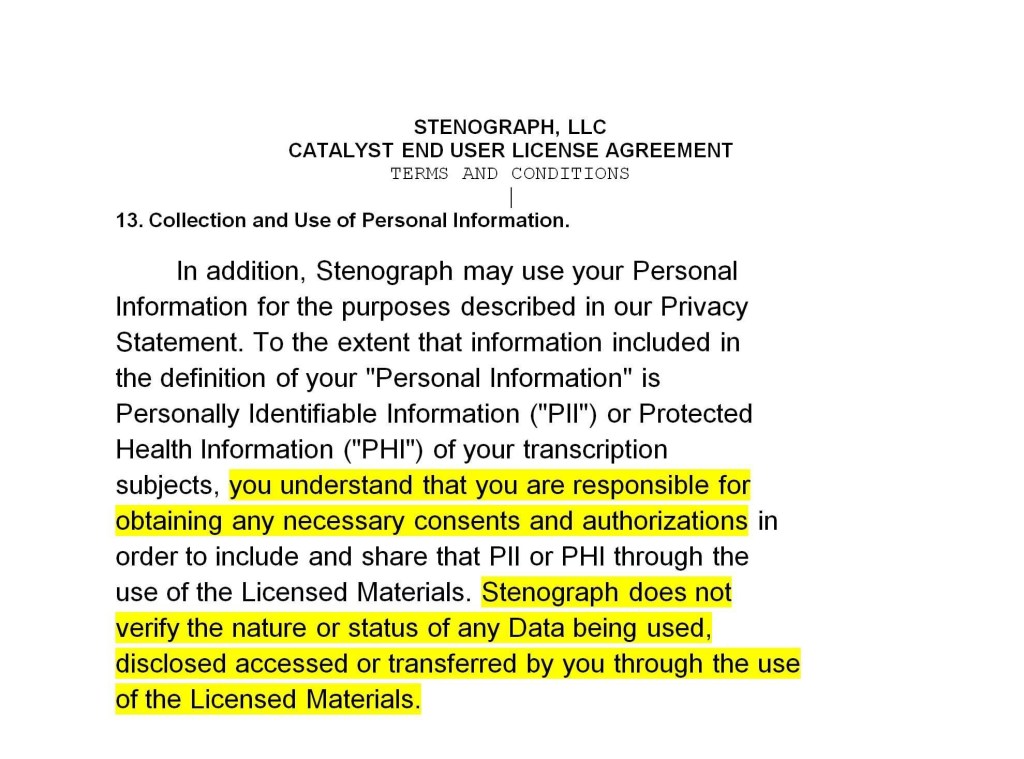
This is a bait and switch. This behavior is disgusting and in my opinion we shouldn’t condone it as a field. It’s very clear what’s happening. Stenograph does not have an answer for why it is requiring stenographers to get releases for data it wants to steal from us or the liability it wants to be put on us, as per its licensing agreement:
“You understand you are responsible for obtaining consents and authorizations for data we may or may not be using.” – Stenograph (parody)“We may be using your data to build our digital reporting products, but you’re not entitled to anything from it, which we’ve just unilaterally decided.” – Stenograph (parody)
Since Stenograph doesn’t have an answer, it doesn’t want to be in a position where that’s revealed. Again, I know factually that there are great people that work for the company and great software trainers for the software. That does not excuse what they’re doing. They’re barreling into automatic speech recognition in a haphazard, might-makes-right, and manipulative way that should give us all pause. We are the profession of blatant honesty. You say it, we write it. Can we not agree that this is not a direction we want a company, one that is practically our namesake, to take?
I have a message for Anir Dutta and Stenograph: We may not be computer programmers or $10 million companies, but human intelligence is not linear, it’s on a bell curve. We are not “stupid scribes” for you to play word games with. Words are all we know. We listen to people for a living, and we know when we’re hearing lies. If you have deluded yourselves into believing that you are so far ahead of all of us on the curve that you can lie to us with impunity, then I offer you the same stenographic proverb I offered Naegeli. TKPWHRUBG.
If you want to learn about parts for a new system, read the beginning. If you want to troubleshoot your current system, scroll down to “But I want to troubleshoot on my current system.”
TLDR: RAM is extremely important for our work.
Windows users, in today’s world of remote reporting and computing confusion it can help a little bit to have a simple guide on what you’re looking at when you’re buying a computer. If you’ve got a system you’re comfortable with, this one is NOT FOR YOU. For everybody else, let’s break things down into simple. If you’ve got a friend who has trouble with computers, this might help them with their shopping choices.
When you go to buy a computer, you’ll probably end up on a screen like this:
And then you’re probably going to end up clicking one of these and ending up on a screen like this. Remember, when buying a computer, the specifications tab is YOUR FRIEND.
In this particular listing, we luck out, because a lot of the specifications are also posted right at the top. Sometimes this is not the case. In this particular listing, we are also allowed to customize our specifications (specs) a little bit. Please note, this is being given as an example and not an endorsement of any site, product, or company. One of the first things you want to answer: Does the operating system fit the programs I want on the computer? This can include things like your printer. As an example, if a printer has been made to work specifically with Windows and has no Chrome driver, it might be extremely difficult or impossible to make it work with Chrome. In computers, a driver is computer code or software that helps the computer know what to do with hardware. Software is the code, apps, and programs on your computer. Hardware is the physical equipment. This is why you need to install the driver for your steno machine every time you get a new system. The driver is software teaching the computer what to do with the steno machine’s stuff. Some examples: Your steno machine is hardware. Your mouse is hardware. Your keyboard is hardware. Your operating system is software.
For figuring out whether a computer is going to work with the program you want, you should always pull up the program’s minimum specifications. Let’s pull up the minimum specifications for CaseCAT in this example. In this image are a bunch of red arrows and red text. I’m going to repeat everything below the image for easier reading.
Operating System. Also called OS. This is the foundation of the computer and what everything else is running from or on. Some common operating systems are Windows, Linux, Mac, and Chrome. Most stenographic tech is made to run off of Windows. It is possible to partition computers and run two operating systems, but we’re here to keep it simple.
Processor. Also called CPU. How fast your computer figures out stuff. We’re taking down words and that doesn’t require very fast processing speeds normally. If you’re concerned about processing speeds, get a “dual core.” This allows the computer to process multiple things at once. Note that Zoom’s minimum requirement is a dual core 2 GHZ requirement. If you want to run Zoom and stenographic tech on the same system, you probably want a dual core processor with more than 2 GHZ or a quad core processor.
RAM, also referred to as memory. Random Access Memory. This is where the computer stores information about programs you have open. This should not be confused with hard drive “memory.” It is always a smaller number like 2GB, 4GB, 8 GB, or 16 GB. If your computer is freezing, it’s probably because it’s out of RAM! Note that the minimum for Zoom is 4 GB, so if you want to run stenographic tech and Zoom on the same system, you probably want 8GB or 16 GB of RAM.
Hard Drive, sometimes referred to as memory. Almost always a big number like 256 GB, 512 GB, or 1 TB (~1000GB). This is how much stuff your computer can save. Many people believe that having too much stuff saved on the computer slows it down. This is usually not true. People get confused between hard drive memory and RAM memory. Most of the time your computer is slow because it’s having RAM issues. If the hard drive is almost completely full and you continue trying to save things, you might lose data. Try not to let your hard drive get completely full. Please note that despite all I just wrote, hard drives inside the computer (connected by something called SATA, SSD, etc.) are always faster than hard drives that are plugged in by USB. Programs you run often or files you open often should be installed on the hard drive inside your computer and not a USB hard drive or flash drive.
Video Card. Often referred to as GPU or graphics processing unit. Stenographic tech works on very old video cards. This is probably low on your priority list. Same for audio and your monitor. If you intend to use a computer for gaming or rendering graphics, you want a good video card.
When you’re looking at getting a new system, your biggest considerations are the operating system, the RAM, and the hard drive space. If you are going to be using the computer to run Zoom, you also want to check those minimum requirements. If you are going to be running Zoom and your stenographic software on the same computer, you want to be better than minimum requirements.
To wrap things up, this $399 desktop computer in this example appears to be a great work computer. Correct operating system, 8 GB RAM, good processor, lots of hard drive space. When you buy a laptop it’s often more expensive because you’re paying for the convenience of mobility. If you are looking for value and do most of your work from one location a desktop is usually superior value; you will often get better computer parts for a lower price as compared to a laptop. Be cautious with regard to netbooks. Some of them have very low RAM or processing power, and may or may not be suitable for our work.
My personal feelings? Brand hardly matters. It’s all about those numbers. You want lots of RAM and a dual or quad core processor.
“But I want to troubleshoot problems on my current system.“
I’ve got something for you. In Windows there are a few ways to check what’s going on in your computer. You can pull your system information by using your search bar. Using everything we just talked about, let’s see if we can identify the important parts.
Remember, Operating System, Processor, RAM. By knowing what system you’re running on today, you can figure out where your problem is. This computer has 32 GB of RAM. That means I can have a lot of stuff open before it freezes on me. If you’re having freezing problems, what can you do?
First, open your task manager. You can do this by using CTRL + ALT + DELETE and opening the task manager, or going to “run” and opening taskmgr.
CTRL ALT DELETE:
RUN TASKMGR:
Whatever you do, you end up at a screen that looks kind of like this:
This screen is very important because it can tell you what is taking up all your RAM or Memory. Remember, this computer is running 32 GB RAM and 20 percent of it is in use while I’m working on Microsoft Teams without CaseCAT open. That’s almost 7 GB of RAM. If I had an 8 GB RAM computer, it would be incredibly close to freezing!
What can we learn from this? If you are working and you have Chrome or an internet browser open, you might be using RAM that your computer needs to run CaseCAT, Zoom, etc.
Facebooking taking up your RAM? Right click and end task!Don’t let online shopping bust your zepo/depo/court/CART/comp!
Final note. Computers, printers, and other devices generally work by running electricity through the parts on and off to produce the result we want. If you are having a problem with your computer or another device and cannot figure out the reason, power it down completely. Unplug it if you have to. Sometimes these electrical charges get caught in a “bad loop” and cause glitches or errors that simply cannot be troubleshooted. When you power down your device, you stop the electricity running through it, and break the “bad loop.” This is why the first line of tech support is always “did you try turning it off and then on again?”
Nobody is born knowing about computers, so if you don’t know something, ask. It’s a lot better than buying something that doesn’t work for you.
PS. Stenonymous runs ad free to keep your reading experience pleasurable. If you find the articles here helpful or informational, please consider donating. With over 8,000 visitors and 13,000 views a year, this site could run ad free for over a decade if everyone contributed just one dollar. I could also afford more ad campaigns for articles and/or hire guest writers and investigators for better article quality. If you don’t want to donate to my blog, then at least shoot over some suggestions for my Resource Page. You can contact me at Chris@Stenonymous.com, assuming I didn’t break that again. If you haven’t been to my resource page, check it out. It’s one of the few ways I have of platforming others’ work.
Lauren Lawrence from Stenovate had reached out to me some time ago to alert me to the new platform she was working on. It’s received funding and seems ready to launch by 2019.
The concept seems to be a simple one. We have so many different apps and services we use to track work, send work, find work, handle bills — wouldn’t it be so nice if all of that was contained in one central repository or platform? I think it would it would, and I’m pretty sure that’s the dream behind this.
My advice? If you’re the type of person that wants or needs this kind of service, jump in early. On the one hand, you’ll be showing there’s a serious market for what’s being sold. On the other hand, younger companies, in my experience, are more responsive to their customers’ thoughts and feelings. Your usage of the product and feedback may go into making the product even better.
I’ve been following it for a while and it seems like the kind of thing conceptually that I might’ve wanted as a freelancer. Will it be a success? I think so. If Stenovate is successful in getting people to try it out and addressing concerns of its consumers, it’s got a solid shot at becoming a standard court reporting program and luring stenographers off alternatives like Dropbox. That’s a tall order, but when you’ve got a determined businesswoman and a vision, anything’s possible, a posse ad esse!
There are a great number of ways to achieve an E-signature. Among the least expensive and least reliant on outside vendors like Adobe or Real Legal is detailed here.
Go to your certification include.
CTRL + Print Screen, also known as PRT SCRN on some keyboards, usually next to scroll lock and above insert or home keys. This takes an image of your screen.
Go to the paint program, paste it into paint with CTRL + V.
Use the select tool in paint to select a small box of your signature line and the space above it. Right click and copy. Alternatively, use CTRL + C to copy.
Paste it into a new paint file. Make sure the paint file is only as large as your signature image.
Draw your signature in. Save the file as a .png.
Go back to CaseCAT and create a new certification include. Delete the blank line, F4 + L for new line, and then edit, insert, image. Bring the signature image into your cert. Remember to save!
E-Signing without reliance on other vendors.
Please note, on some laptops and keyboards, the print screen function requires you to press the fn or function key before it will work. So you may have to hit CTRL + Fn + PRT SCRN.